FREE LD product

FREE LD product
FREE Giraffing Out Aloud Product worth $40+ when you open a LD account

Monday, 21 November 2011

How to use the Rosette SVG with your Pazzles Inspiration


Once you have purchased the Accordion Fold Rosettesdownloaded the entire file or saved an individual file to your computer you are ready to import your SVG into your Pazzles Inspiration software.

When you have opened up your Pazzles Inspiration Studio Pro Software, select IMPORT - SVG.
You can import as many of the files you like onto your mat as I have done here.


In this screen shot below I have just selected one file. Select the Accordion Rosette and make sure it is GROUPED.   Now, I would like to change the size of the Accordion Rosette.  Select the Accordion Rosette and go to the TRANSFORMATION MENU found in  TOOLS - TRANSFORM - WIDTH (L).  Or you can select 'L' on your keyboard for a short cut to the Transformation Menu.  The width of the Accordion Rosette is 9.198 but I want to make it smaller.


WIDTH should be highlighted in the menu.  Change the 'W' (width) to 7" by typing in the number -DUPLICATE - APPLY.

Move the smaller Accordion Rosette to beneath the original one and you will see that it has reduced in size.
Now you can play about to your hearts content at making any size of 
Accordion Rosette any size you wish!

In the screen shot below I selected my original Accordion Rosette that I had imported onto my mat and checked it was GROUPED.  I then went to EDIT, - MULTIPLY OBJECT, on the menu bar and typed in the NUMBER OF COPIES I wanted (5 in this case) -  adjusted the DOWN spacing - SELECT the DOWN ARROW, then OK.


Using SVG's with your original Pazzles Inspiration software
"no problem"

If you have the original software for your Pazzles you will need to download a FREE program called INKSCAPE.  You can then open your SVG file in INKSCAPE and save as a .dxf file. Then import the .dxf file into your original Pazzles software.  Either way you can have fun with Lettering Delights .svg and cut-its files (just a few extra steps this way).

Cut your file out - fold the Accordion Rosette accordingly - glue the ends together - push down the middle of the rosette and glue the smaller circle onto the rosette to hold together.

What do you think of my 1st tutorial?  
Would you like to see more tutorials using Lettering Delights files with my 
Pazzles Inspiration?

I am no expect but this tutorial is the way I do it and as they say ......"it works for me!"
  I would love some feed back from Pazzle users but hope this helps other crafters who use similar software to the Pazzles Studio Pro, with their electronic die cutting machines.

Happy Pazzling!

Click here to get your Accordion Rosette SVG's

Click here to see all my favourite files hand picked by me for Joanna's Pretty Picks Bundle.

Sunday, 20 November 2011

Accordion Fold Rosettes - SVG file


I love Accordion Fold Rosettes and I was so pleased that Lettering Delights put this SVG set in my bundle called Joanna's Pretty Picks Bundle.  It is so easy to use with your Pazzles Inspiration.

Here's an SVG set with a bit of a twist...or rather a fold! {grin} Cut the edge pattern of your choice (I'm betting you'll want to try them all!), fold on the designated markings, add a drop of glue here and there to hold in place, add a center (the last seven images of the set) and viola! You've got a fun, dimensional flower to add to cards, gifts, bags, and tags. {Tip: for flatter flowers, cut two and glue together.} 
What I like about this set is the different style of edging to each of the rosettes.  Of course with your electronic die cutting machine you can make them what ever size you like!


I have also used the Signs Of The Seasons Tiles which is a beautiful paper pack. Filled with great shapes and colours for this wonderful time of the year and the frosty days that surround this holiday season and other times of the year.

Click here to get these 2 sets and lots more in Joanna's Pretty Picks Bundle. 


Cracker Favor Boxes, Quilled Flowers & Tiles!

 I thought I would show you some more photos of the Cracker Favor Boxes from


Did you notice the different trims to each of the Cracker Favor Boxes....each one 
is different in the file!


Using SVG's with your Pazzles Inspiration.

If you have the Inspiration Studio Pro Software, these files will import directly into your software (no problem).

If you have the original software for your Pazzles you will need to download a FREE program called INKSCAPE.  You will need to open your SVG file in INKSCAPE and save as a .dxf file. Then import the .dxf file into your original Pazzles software.  Either way you can have fun with this file (just a few extra steps this way).


With all the Crackers I have also cut this gorgeous Quilled Flower with my Pazzles Inspiration electronic die cutting machine. 

Quilling is an art form using strips of paper that are rolled, shaped, and glued together to create decorative designs. The paper is wound around a quill to create a basic coil shape. The paper is glued at the tip and then shaped to form various ornamental patterns similar to ironwork. This set of flowers will keep you busy creating a whole bouquet of lovely blooms. 


Cut It files are designed specifically with cutting machines in mind. Each Cut It set includes several different file formats (ai, dxf, eps, gsd, jpg, pdf and svg).  If you don't have a cutting machine, you can still use these graphics, but you will need to use a third party software program.


This photo shows only 4 of the 9 crackers in the set.  I have also used Signs of The Seasons Tiles.  Now these tiles come in .jpg format which enables Pazzles users to import them directly into your Textures folder with endless possibilities!


Click here to see all the other files in Joanna's Pretty Picks Bundle.

I hope you like them just as much as I do.


Challenge blogs:
Creative Cutter Room - Anything Goes

Friday, 18 November 2011

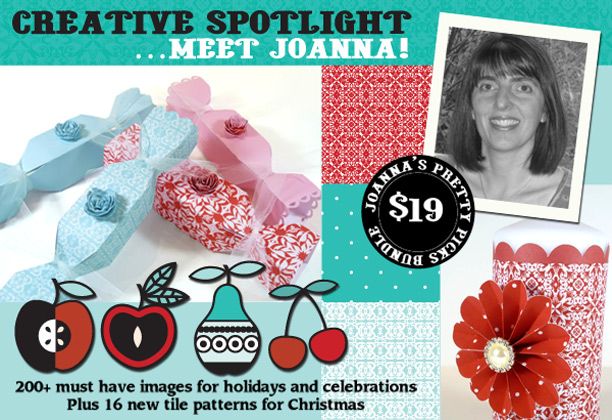
New @ LD's - Joanna's Pretty Picks Bundle!

Joanna's Pretty Picks Bundle

Wow, this is sooooo exciting, I have my very own bundle at Lettering Delights called

Lettering Delights contacted me recently and asked me what files I would like in my bundle and here it is!


Just in time for the holidays, I have hand-picked a collection of products that are perfect for all kinds of celebrations. These 14 product sets (over 200 images in all) include must-have basics like tags, frames, dimensional flowers and cupcake wrappers. New English Cracker Favor Boxes are ready to stuff with all kinds of treats, favors and collectibles. And, you'll love how the new Signs of the Seasons Tiles will help you creatively customize these sets.
Here is how my Cracker Favor Box turned out!


These Cracker Favor Boxes are traditionally used at Christmas.  They are laid at each place setting and filled with a Christmas joke, paper hat and novelty gift.  When the cracker is pulled between 2 people the one holding the larger end of the cracker receives the gift.  However these Cracker Favor Boxes can also be used as Wedding or Party Favor Boxes.

I had great fun cutting these using my Pazzles Inspiration electronic cutting machine and I know you will have great fun too.  Each box comes with different edging and it was so difficult to choose as they are all gorgeous!


Over the next few days I will be showing you more of the bundle.  There are lots of Cut It's files which are perfect for crafter's who own a Pazzles Inspiration like me or another similar electronic die cutting machine.

Cut It files are designed specifically with cutting machines in mind. Each Cut It set includes several different file formats (ai, dxf, eps, gsd, jpg, pdf and svg). 

Take  a look here at some of my Pretty Picks.


You will see that there are lots of Basics such a frames, basic borders, tags, and cupcake wrappers. There are also some extras to help with your crafting projects like the Quilled Flowers, 
Simple Leaves and Rosettes.

I hope you like my choice of bundle take a look as I am sure there will be something that you would like!

Save 60% and get the entire bundle, 

Tuesday, 15 November 2011

Story Fonts - Two For Tuesday at Lettering Delights

Are you good at spinning a tale? You provide the words and we'll help you add the look of a great story to your great story with the fonts offered in this week's Two for Tuesday bundle. For all your 'once-upon-a-time' creativity, these storytime fonts add a magical final touch. 


Click here to get both LD Rumpelstiltskin and LD Ugly Duckling 
for $3.00 only! 

Offer ends Monday, November 21st at midnight, MST 
at Lettering Delights.

Friday, 11 November 2011

Freebie at Lettering Delights and 111 items @ $1.11 each


Celebrate 11-11-11 with a Veteran’s Day Sale at Lettering Delights. 


They have combined a selection of 111 items and priced them at just $1.11 each. Select from popular fonts, Doodlebats, alphabets, graphics, cut-it sets and paper packs...many of which 
have never been priced this low. 

Keeping with the number 11, click here to get your $11 Cut-Its Bundle. Lettering Delights have loaded it up with 11 popular cut-it sets all priced at less than $1 each. 

There is another reason to visit LD today? A fabulous freebie.....
Click here to get your FREEBIE 2011 Frames.

Click here to see the  $11 Cut-Its Bundle

Remember to get your FREEBIE first, (don't log out) wait for your confirmation e-mail which will give you a 25% coupon to use on your purchase if you continue to go to the $11 Cut-Its Bundle!!!!

Hurry! Sale ends in 4 days on Monday, November 14 at midnight mdt.